The free postcard templates on this page are made for Microsoft Word — which makes them the right choice when you want to type in your text, print at home or at a local print shop, and mail the cards without signing up for an online design tool. The set includes standard 4×6 and 5×7 layouts for travel notes, holiday greetings, thank-you cards, and marketing mailers, and several include a mail-ready back with address lines and a stamp corner. Below the downloads you’ll find the standard postcard sizes, what a correctly laid-out postcard back looks like, and how to set up and print postcards in Word.
Standard Postcard Sizes
- 4×6 inches — the classic postcard and the most economical: in the US, cards between 3.5×5″ and 4.25×6″ qualify for the cheaper postcard postage rate. Two fit on one letter-size sheet.
- 5×7 inches — a roomier format popular for invitations, announcements, and photo cards. Note that in the US this size mails at the letter rate, not the postcard rate.
- 6×11 inches — the oversized format used for marketing and real-estate mailers, where standing out in a mail pile is the point. Mails at larger-envelope (“flat”) rates.
If postage cost matters for a large mailing, stick to 4×6 — and check current rates with your postal service before printing, since rates change regularly even though the size rules stay stable.
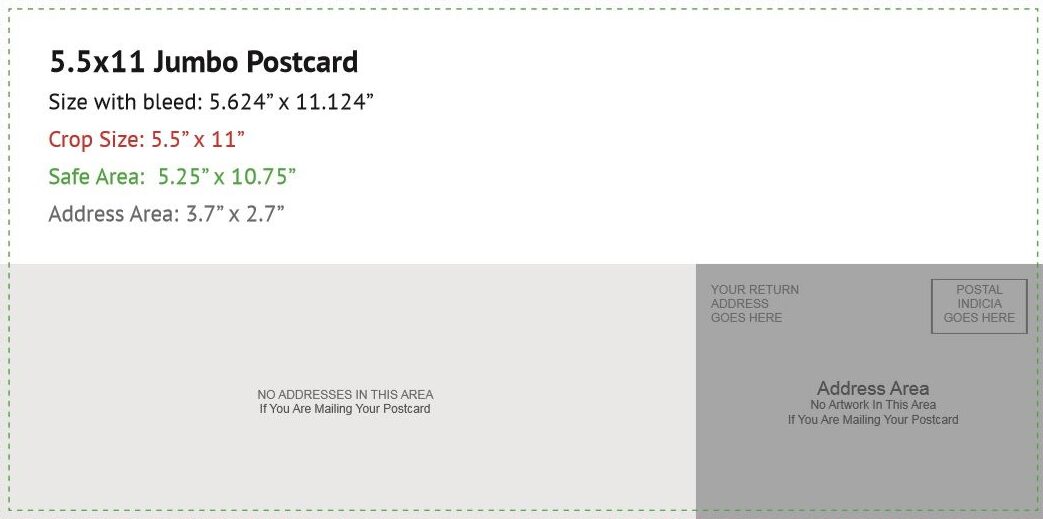
How a Postcard Back Is Laid Out
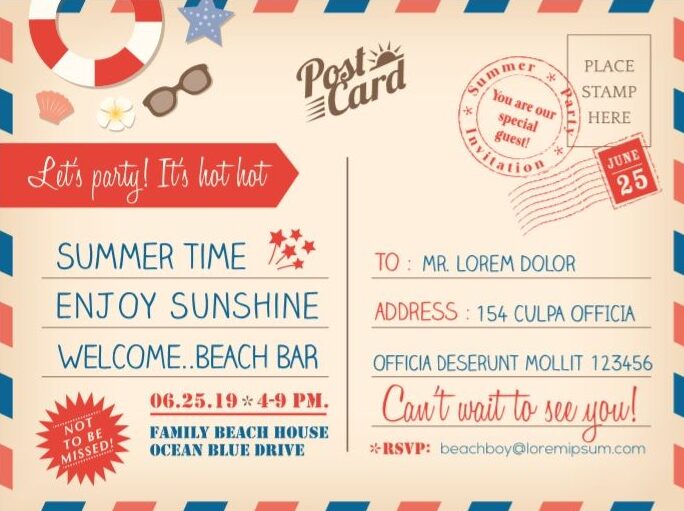
A mailable postcard uses the “divided back” format: your message on the left half, the recipient’s address on the right, and the stamp in the top-right corner. Several of the templates below include this back as a second page:
|
Message area Dear Sarah, See you soon, |
STAMP
Sarah Mitchell ___________
128 Rosewood Lane _______ Springfield, ST 00000 ____ |
The dividing line matters: postal sorting expects the address on the right half, kept clear of decoration, with the bottom strip of the card left free for the postal barcode.
Free Postcard Templates in MS Word
Every template below is editable in Word — replace the text, swap in your own photos, and print on cardstock. Templates marked “front and back” include the divided mailing side as a second page.
Download this Free Postcard Template by clicking on this button.


Download this Free Postcard Template by clicking on this button.

Download this Free Postcard Template by clicking on this button.

Download this Free Postcard Template by clicking on this button.

Download this Free Postcard Template by clicking on this button.

Download this Free Postcard Template by clicking on this button.

Download this Free Postcard Template by clicking on this button.
Download this Free Postcard Template by clicking on this button.

Download this Free Postcard Template by clicking on this button.

Download this Free Postcard Template by clicking on this button.
How to Make and Print a Postcard in Word
- Set the page size: Layout ? Size ? More Paper Sizes ? enter 6″ width × 4″ height (or 7×5). Set all margins to about 0.25″ via Layout ? Margins ? Custom Margins.
- Design the front: insert your photo (Insert ? Pictures), drag it to fill the page, and set text wrapping to “Behind Text” so you can lay a headline over it if you want one.
- Add the back as page two: insert a page break, add a vertical line down the center (Insert ? Shapes ? Line), address lines on the right, and leave the bottom strip clear if you’re mailing.
- Choose the right paper: print on cardstock between 200 and 300 gsm (65–110 lb cover). Standard printer paper is too flimsy for a postcard — it curls in the mail and feels like a flyer.
- Print and cut: for 4×6 cards, print two per letter-size sheet (Print ? 2 pages per sheet) and cut, or print onto pre-scored 4×6 postcard stock. For double-sided cards, use your printer’s manual duplex option and run a single test sheet first to check the back aligns with the front.
- Edge-to-edge photos: most home printers leave a small white border. Either embrace it as a frame, enable your printer’s borderless setting if it has one, or have the file printed at a local print shop for true full-bleed.
Frequently Asked Questions
What is the standard postcard size?
4×6 inches is the standard. 5×7 is common for invitations and photo cards, and 6×11 for marketing mailers. In the US, only cards up to 4.25×6 inches qualify for the discounted postcard postage rate — larger sizes mail at letter or flat rates.
How do I make a postcard in Microsoft Word?
Set a custom page size of 6×4 inches with quarter-inch margins, place your photo or design on page one, and build the divided mailing back on page two. The numbered steps above walk through each setting, or download a template with the setup already done.
What paper should I print postcards on?
Cardstock between 200 and 300 gsm (65–110 lb cover). It’s stiff enough to survive mailing and feels like a real postcard. Check your printer’s specifications first — some home printers only feed cardstock through a rear or manual tray.
How do I address a postcard?
On the divided back: message on the left half, recipient’s full address on the right half, stamp in the top-right corner. Keep the right half free of drawings or text other than the address, and leave the strip along the bottom clear for the postal barcode.
Do postcards need envelopes?
No — mailing without an envelope is what makes it a postcard. In fact, putting a card in an envelope means it mails as a letter, losing the postcard rate. Skip the envelope, use cardstock sturdy enough for the trip, and don’t include anything you’d mind the world reading.

Pete Smith is a Business Management graduate and a passionate advocate for practical, accessible resources that empower professionals and entrepreneurs to succeed. With a strong foundation in organizational strategy and operational efficiency, Pete combines academic knowledge with real-world insights to simplify complex business processes. He is the creator behind a growing online platform dedicated to offering free, high-quality documents, templates, and actionable tips designed to save time and improve productivity.