A menu planner decides what you’re eating this week before you’re standing in front of the fridge at six o’clock wondering. It saves money, cuts waste, and removes a decision you’d otherwise make seven times while tired. The free templates below are editable MS Word files in weekly and monthly layouts, and beneath them you’ll find the method that makes a meal plan survive contact with a real week.
Plan Around the Week You’re Actually Having
This is why most meal plans fail, and it has nothing to do with the template.
People plan seven dinners as though every evening is the same — unhurried, everyone home, an hour available. Then Tuesday turns out to be football, Wednesday somebody works late, and Thursday you get in at eight. The plan called for a slow-cooked ragù on Thursday, so Thursday becomes a takeaway, and by Friday the whole thing has been abandoned.
Look at the diary before you choose a single meal. Which nights is everyone in? Which nights are you home late? Is anyone out? Then match the cooking time to the evening: twenty minutes on the busy nights, something slower on the night you have time, and nothing at all on the night you’re not there.
A plan built around the actual week gets followed. A plan built around an idealised week teaches you that meal planning doesn’t work for you — when in fact it was never planning your week.
The Five-Step Method
- Check what you already have. Open the freezer, the fridge and the cupboard before deciding anything. Plan at least one meal around what needs using up — the half bag of spinach, the mince from last week, the tin nobody has opened in a year. This is where most of the saving comes from.
- Check the diary. Mark the nights that are constrained, and by how much.
- Fill the constrained nights first. Quick meals go where there’s no time. It’s much easier than trying to squeeze a long recipe into a short evening afterwards.
- Fill the rest, aiming for variety across the week rather than within each meal — different proteins, different cuisines, one meat-free night, one that uses the oven while you do something else.
- Write the shopping list from the plan, going meal by meal, checking each ingredient against what you found in step one.
Twenty minutes, once a week. Most people do it on the same day they shop.
A Planned Week
| MENU PLAN | Week of 21–27 September | Using up: spinach, half a chorizo, 3 eggs | |||
| Day | The evening | Dinner | Time |
|---|---|---|---|
| Mon | Normal | Chorizo and chickpea stew — uses the chorizo | 35 min |
| Tue | Football — back 7:15 | Omelette and salad — uses the eggs and spinach | 15 min |
| Wed | Normal | Double batch: chilli — half frozen for next week | 45 min |
| Thu | Home 8pm | Pasta with garlic, chilli and lemon | 12 min |
| Fri | Normal | Fish, oven chips, peas | 30 min |
| Sat | Time to cook | Slow-roast lamb shoulder | 4 hr |
| Sun | — | Leftovers / whatever’s in | — |
| Lunches: Wednesday’s chilli covers Thursday and Friday | Need to buy: lamb shoulder, fish, chickpeas, pasta, lemons | |||
Four decisions made that plan work. The using-up line at the top shaped Monday and Tuesday. The two constrained evenings got the two shortest meals, twelve and fifteen minutes. Wednesday is cooked double and covers two lunches and a future dinner. And Sunday is deliberately unplanned, because a week with no give in it doesn’t survive.
Free Menu Planner Templates in MS Word
Each template below is editable in Word. Print a few at a time and keep them on the fridge — a plan nobody can see is a plan nobody follows.
Editable Menu Planner Word Format

You can acquire this Menu Planner for free by clicking on this download button.

Weekly Menu Plan – MS Word

You can acquire this Menu Planner for free by clicking on this download button.
Family Menu Planner Organizer

You can acquire this Menu Planner for free by clicking on this download button.
Customizable Menu Planner Document
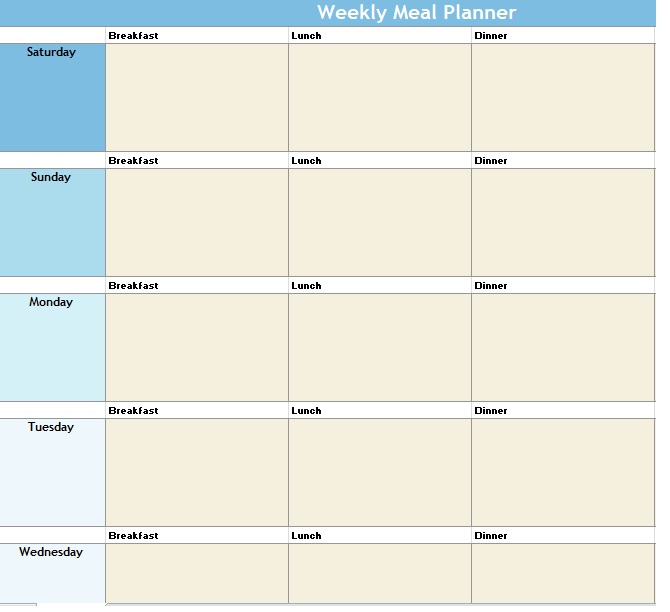
You can acquire this Menu Planner for free by clicking on this download button.
Customizable Menu Planner – Weekly

You can acquire this Menu Planner for free by clicking on this download button.
Diet and Nutrition Menu Planner

You can acquire this Menu Planner for free by clicking on this download button.
Menu Planner for Kid’s Meals

You can acquire this Menu Planner for free by clicking on this download button.
Diet and Nutrition Menu Planner

You can acquire this Menu Planner for free by clicking on this download button.
Personal Menu Planner Tracker

You can acquire this Menu Planner for free by clicking on this download button.
Theme Nights
The simplest way to make planning faster: give each night a category, permanently.
Meat-free Monday, pasta Tuesday, one-pot Wednesday, something from the freezer Thursday, fish Friday, whatever-you-fancy Saturday, leftovers Sunday. The categories matter less than having them — what they do is turn an open question into a narrow one. “What shall we eat on Tuesday?” is exhausting; “which pasta dish?” takes ten seconds.
It also produces natural variety without anyone planning for it, and it makes the shopping list more predictable, which cuts both cost and waste over a few months.
Adapt the categories to how you actually eat. A household that has curry twice a week should have a curry night on the plan rather than pretending otherwise.
Cook Once, Eat Twice
The single biggest time saving available, and it costs almost nothing extra on the night.
Doubling a chilli, a bolognese, a curry, a soup or a traybake takes a few more minutes of chopping and no additional cooking time. Half goes in the freezer, and a future weeknight becomes a ten-minute evening. Build one double-batch night into every week and within a month you have a freezer that solves your worst evenings for you.
Two things that make it work. Label everything with what it is and the date — an unlabelled tub is a tub nobody uses. And write “freezer” on the plan as a meal, so the frozen portions get eaten rather than accumulating.
Things that freeze well: stews, curries, soups, bolognese and other sauces, cooked mince, pastry dishes before baking, bread, and most batter mixes. Less well: anything with a lot of potato, cream-based sauces, and salad leaves, for obvious reasons.
Building the Shopping List
The step that turns a menu plan into a shorter, cheaper shop.
Go through the plan meal by meal and write down what each one needs. Then check every item against what you found in the cupboards at step one — this is where the duplicate bottle of olive oil gets caught. Add the staples you’re low on, then sort the whole list by aisle rather than by meal, so the shop is one pass rather than four.
Our grocery list templates are organised by aisle for exactly this, and the checklist templates suit a master list of staples you keep topped up.
One habit worth adopting: pin the plan and the list together on the fridge. The plan answers “what’s for dinner”, the list gets taken to the shop, and both stop being things you have to remember.
Why Meal Plans Fail
- They assume seven identical evenings. Covered above, and it’s the main one.
- They demand novelty. A rotation of ten to fifteen meals covers most households perfectly well. Meal planning isn’t a cookery course, and nobody minds having the same chilli every third week.
- They’re too ambitious in week one. Planning three meals a day for a family, from scratch, having never done it before, lasts about five days. Start with dinners only.
- They have no slack. Leave one night unplanned. Something always happens.
- They’re invisible. A plan in a notebook in a drawer doesn’t get followed. Put it on the fridge.
- They ignore what’s already in the house. Planning without checking the cupboards is how you end up with four bags of rice and no way to use the spinach.
- They’re abandoned after one bad week. Everyone has a week where it all goes wrong. Print the next one and carry on — the habit survives a missed week far better than it survives starting over.
For the wider week, our weekly planner templates cover work and commitments, and the recipe card templates are for writing down the meals in your rotation.
Frequently Asked Questions
What is a menu planner?
A weekly or monthly sheet setting out which meals you’ll cook on which days. It removes the daily decision, shortens the shop, and cuts waste by letting you plan around what you already have.
How do I start meal planning?
Check what’s already in the cupboards and freezer, look at the week’s diary, assign quick meals to the busy nights, fill the rest, and write the shopping list from the plan. Start with dinners only — planning every meal from day one rarely lasts.
How many meals do I need in rotation?
Ten to fifteen covers most households comfortably. Meal planning fails when people think it requires a new recipe every night; repeating is the point, not a compromise.
How far ahead should I plan meals?
A week at a time for most people — long enough to shop once, short enough that you know what the week holds. Monthly plans tend to be rewritten by week two.
How do I stop wasting food?
Plan at least one meal around what needs using up, check the cupboards before writing the shopping list, and leave one night unplanned so leftovers get eaten rather than thrown away.
What is batch cooking?
Cooking double and freezing half. It adds a few minutes of preparation and no extra cooking time, and turns a future weeknight into a ten-minute evening. Label everything with what it is and the date, and put “freezer” on the plan as a meal so the portions actually get used.
Should I plan breakfast and lunch too?
Eventually, if it helps — but start with dinners. Lunches often plan themselves once you’re batch cooking, since a double-batch dinner usually covers two lunches as well.

Pete Smith is a Business Management graduate and a passionate advocate for practical, accessible resources that empower professionals and entrepreneurs to succeed. With a strong foundation in organizational strategy and operational efficiency, Pete combines academic knowledge with real-world insights to simplify complex business processes. He is the creator behind a growing online platform dedicated to offering free, high-quality documents, templates, and actionable tips designed to save time and improve productivity.