An event plan is the internal document that gets an event delivered — the timeline, the budget, the suppliers, and the minute-by-minute running order for the day. Guests never see it, which is exactly why it has to be right. The free templates below are editable MS Word files, and beneath them you’ll find a countdown timeline, a worked run sheet, and the checklist of things that get forgotten until the morning of the event.
Start With the Purpose and the Number
Two decisions shape everything else, and getting them wrong early is expensive to fix late.
What is the event for? Not “a conference” — what has to be true afterwards for it to have been worth doing. Thirty new leads. A team that knows next year’s strategy. £8,000 raised. A community that turned up and met each other. Write it at the top of the plan, because every later decision — venue, catering, format, budget — should be answerable to it.
How many people? This determines the venue, the catering, the staffing and most of the cost. Be realistic rather than hopeful: plan for the number you’re confident of, with a stated ceiling. An event built for 200 that attracts 80 feels like a failure in a way that an event built for 80 that attracts 80 doesn’t — same attendance, entirely different atmosphere.
Then write both numbers down. The most common cause of an event going over budget is a headcount that crept up without anyone deciding it should.
Plan Backwards From the Date
Working forwards from today produces a plan that runs out of time. Working backwards from the event date shows you immediately whether it’s possible.
| When | What has to be done |
|---|---|
| 6–12 months | Purpose and target numbers agreed · budget set · date chosen and checked against other events · venue booked · major suppliers approached · key speakers or performers invited |
| 3–6 months | Catering booked · AV and equipment confirmed · programme drafted · sponsors approached · marketing plan agreed · insurance and licences checked · accessibility requirements considered |
| 2–3 months | Invitations or tickets out · risk assessment completed · running order drafted · signage and print designed · dietary and access requirements collected with RSVPs |
| 1 month | Numbers confirmed to caterer · staffing rota agreed · run sheet written · all suppliers reconfirmed in writing · contingency plan for weather or low turnout |
| 1 week | Final numbers · everything printed · team briefed with the run sheet · contact list circulated · deliveries confirmed for the right day and door |
| Day before | Set up if the venue allows · AV tested with the actual laptop · signage placed · float counted · everything you’ll need loaded in one place |
| On the day | Run sheet in hand · someone on the door · someone free to deal with problems · nobody who is running the event also presenting at it |
| Within 2 weeks | Thank-yous sent · sponsor report issued · invoices settled · feedback gathered · debrief held while everyone still remembers |
Two lines in that table are the ones people wish they’d read. Test the AV with the actual laptop that will be used, not a similar one — the adaptor, the resolution and the sound output are where presentations fail. And whoever is running the event shouldn’t also be presenting at it; the moment you’re on stage is the moment the caterer arrives at the wrong door.
The Budget
List every line before you commit to anything, including the ones that don’t feel like costs:
- Venue — hire, plus any charges for extra hours, cleaning, security or damage deposit.
- Catering — per head, plus staff meals, plus a margin for the guests who didn’t RSVP.
- AV and equipment — hire, delivery, collection, and a technician if you need one.
- Speakers or entertainment — fee, travel, accommodation.
- Print and signage.
- Insurance and licences.
- Staffing — including overtime for your own people, which is a real cost even when it isn’t invoiced.
- Contingency — 10% at minimum. Something always costs more than quoted.
Record both the quoted and the actual figure for each line as you go. It takes no extra effort during the event and makes next year’s budget a matter of arithmetic rather than guesswork.
If you’re seeking financial support, our sponsorship proposal templates cover packages and pricing.
The Run Sheet
The document for the day itself, and a different thing from the plan. It’s the minute-by-minute schedule that lets someone else take over if you’re unreachable — which is its real purpose.
|
RUN SHEET | Riverside Community Trust Annual Supper | Saturday 14 November 2026 Venue: Mill Lane Hall | Event lead: D. Ferreira, 07700 000401 | Expected: 120 |
|||
| Time | What happens | Who | Notes |
|---|---|---|---|
| 14:00 | Hall access begins — collect keys from caretaker | D. Ferreira | Caretaker: 07700 000355 |
| 14:15 | Tables and chairs set — 12 tables of 10 | Volunteers ×6 | Layout plan on the noticeboard |
| 15:00 | AV setup and sound check with the actual laptop | M. Chen | HDMI + USB-C adaptor in the black box |
| 16:30 | Caterer arrives — rear door, Dock Road side | S. Malik | Harbour Catering: 01000 000512 |
| 17:30 | Raffle table set up; float counted (£80 in coins) | L. Brennan | Tickets in the blue folder |
| 18:00 | Team briefing — everyone, 10 minutes | D. Ferreira | Run through this sheet |
| 18:30 | Doors open · welcome desk staffed | R. Silva + 1 | Name list and spare pens |
| 19:00 | Welcome from the Chair (5 min) | A. Farouk | Mic on from 18:55 |
| 19:10 | Supper served | Caterer | 4 vegan · 2 GF · 1 nut allergy — table 3 |
| 20:15 | Raffle draw | L. Brennan | Prizes behind the stage |
| 22:30 | Close · clear down · check nothing left behind | All | Hall must be empty by 23:30 |
| If something goes wrong: D. Ferreira 07700 000401 · deputy S. Malik 07700 000402 · venue caretaker 07700 000355 · first aider on site: R. Silva | |||
Four things make a run sheet work. Every line has a named person, not a team. Phone numbers are on the sheet, so nobody is searching an inbox at half past four. The dietary requirements are written where the food is served, not filed in a spreadsheet. And the escalation line at the foot means a volunteer who finds a problem knows exactly who to call.
Free Event Planner Templates in MS Word
Each template below is editable in Word. Start with the timeline, then build the run sheet a month out.
Event Planning Timeline Template

A countdown structure from twelve months out to the week after, with space for owners and deadlines against each stage.


To acquire this event planner template, simply click on below download button.
Event Run Sheet Template
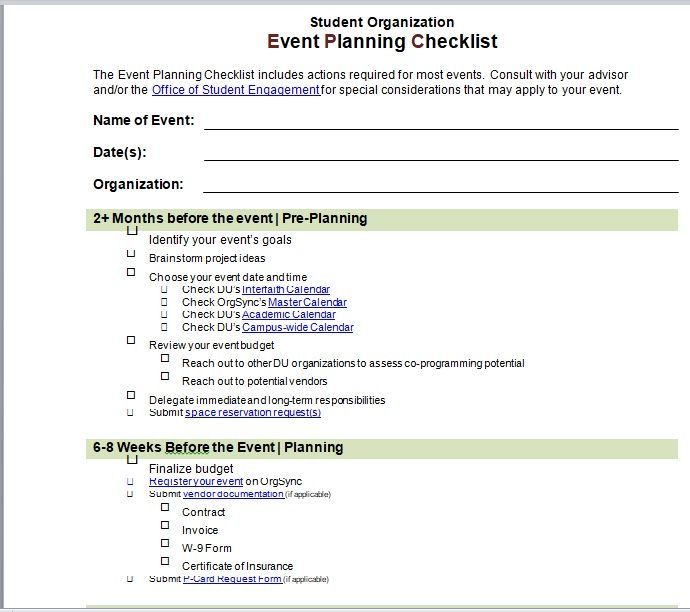
The minute-by-minute schedule for the day — time, activity, named owner, notes, and an escalation block at the foot.

To acquire this event planner template, simply click on below download button.

To acquire this event planner template, simply click on below download button.

To acquire this event planner template, simply click on below download button.

To acquire this event planner template, simply click on below download button.

To acquire this event planner template, simply click on below download button.
What Events Forget
The list that separates an event that runs smoothly from one that mostly does:
- Accessibility. Step-free access, an accessible toilet, seating for people who can’t stand, a hearing loop, large-print materials, and a quieter space. Ask about requirements on the RSVP rather than assuming nobody has any.
- Licences. Alcohol, live or recorded music, food sales, raffles, street closures — several of these need permission, and some need weeks of notice.
- Insurance. Public liability is required by most venues, and your own may not cover an event off your premises.
- A risk assessment. Most venues ask for one, and it’s the document that makes you notice the trailing cable and the fire exit behind the buffet table.
- First aid. Who is trained, where the kit is, and where the nearest defibrillator is.
- Dietary requirements — collected at RSVP, passed to the caterer in writing, and printed on the run sheet.
- Weather. Anything outdoors needs a wet-weather plan decided in advance, with a stated time for making the call.
- Power. How many sockets, where they are, and whether you need extension leads taped down.
- Parking and transport, and what to tell guests who are arriving by public transport after dark.
- Photography consent, particularly where children are present. A sign at the entrance and a note on the invitation covers most situations.
- Clearing up. Who, how long it takes, where the rubbish goes, and what time the venue needs the keys back.
- Somebody free. One person with no fixed job whose role is to handle whatever happens. Events without one run on whoever is least busy at the moment something goes wrong.
Turn the list into dated tasks with our action plan templates, and keep supplier and team numbers on a contact list that travels with the run sheet.
Virtual and Hybrid Events
Different failure modes, so the plan needs different sections.
- Run a full tech rehearsal a few days ahead, with the actual presenters, on the actual platform, sharing the actual slides. Not a quick call — a proper run-through. Most virtual event problems are things a rehearsal would have found.
- Give someone the job of watching the chat. A presenter cannot present and monitor questions at once, and unanswered chat is the fastest way to lose a virtual audience.
- Have a host separate from the speaker — someone to admit people, manage mutes, introduce, and fill if something breaks.
- Shorten everything. Attention online runs out considerably faster than in a room. Sessions of 20–30 minutes with real breaks beat a replicated full-day agenda.
- State the timezone on every communication, and give the local time for your main audiences.
- Decide about recording in advance — whether you’re recording, telling attendees, where it will be published, and how long it’s kept.
- Plan for the platform failing. A backup link, a phone dial-in, and a way to tell people what’s happening if the main platform goes down.
- For hybrid, treat the online audience as a real audience — a camera that shows the speaker rather than the back of the room, a microphone that picks up questions from the floor, and someone whose job is the remote attendees. Hybrid events that treat online guests as an afterthought are worse than either format alone.
The Debrief
Half an hour, within two weeks, while people still remember. Four questions: what worked, what didn’t, what surprised us, and what would we do differently?
Record the numbers alongside the opinions — attendance against target, spend against budget, money raised, feedback scores. Then write it down and file it with the plan, because the person organising next year’s event may not be you, and a folder containing last year’s plan, run sheet, supplier contacts and debrief is worth more to them than any template.
And thank people specifically. Volunteers, speakers, the caretaker who unlocked the hall at two o’clock — a named thank-you within a fortnight is what makes the same people say yes next time. If you had sponsors, send them a report with attendance figures and photographs; our sponsorship proposal page covers what that report should contain.
Frequently Asked Questions
What should an event plan include?
The purpose and target attendance, a countdown timeline, a budget with quoted and actual figures, supplier and contact details, a staffing plan, a risk assessment, a run sheet for the day, and a debrief afterwards.
What is a run sheet?
The minute-by-minute schedule for the event day — time, what happens, who is responsible, and any notes. Its purpose is to let someone else take over if you’re unreachable, so every line needs a named person and the relevant phone numbers on the page.
How far in advance should I start planning an event?
Six to twelve months for anything with a venue booking and external speakers, three to six months for a medium-sized event, and at least a month for something small. Work backwards from the date rather than forwards from today.
What do most events forget?
Accessibility, licences, insurance, a risk assessment, first aid cover, a wet weather plan, power and cabling, photography consent, and who clears up. Also one person with no fixed role, free to deal with whatever happens.
How much contingency should an event budget have?
At least 10%. Record quoted and actual costs against each line as you go — it makes the following year’s budget arithmetic rather than guesswork.
How do I plan a virtual event?
Run a full tech rehearsal with the real presenters and platform, give someone the job of monitoring chat, keep a host separate from the speaker, shorten every session, state the timezone, and have a plan for the platform failing.
What is the difference between an event plan and a run sheet?
The plan covers everything from the first decision to the debrief, over months. The run sheet covers a single day, minute by minute, and is the document people hold in their hands while the event is happening.

Pete Smith is a Business Management graduate and a passionate advocate for practical, accessible resources that empower professionals and entrepreneurs to succeed. With a strong foundation in organizational strategy and operational efficiency, Pete combines academic knowledge with real-world insights to simplify complex business processes. He is the creator behind a growing online platform dedicated to offering free, high-quality documents, templates, and actionable tips designed to save time and improve productivity.