A business continuity plan (BCP) is a document that spells out how your business will keep operating during a disruption — a fire, flood, power or internet outage, cyberattack, supplier failure, or the sudden loss of a key person. It identifies which functions are critical, how quickly each must be restored, and who does what when something goes wrong. The free templates below are editable in MS Word; beneath them you’ll find the standard BCP structure section by section, an example of the critical-functions analysis at the heart of every plan, and guidance for small businesses.
What a Business Continuity Plan Contains
Whatever its length, a working BCP covers six things:
1. Business impact analysis (BIA). A ranked list of your business functions by criticality: what stops the business immediately (order processing, production), what can wait days (payroll, reporting), and what can wait weeks. For each critical function, note what a day of downtime actually costs — lost revenue, penalties, lost customers. This analysis drives every other decision in the plan.
2. Recovery objectives. Two numbers per critical function: the RTO (recovery time objective — how quickly the function must be running again) and the RPO (recovery point objective — how much data you can afford to lose, which sets how often you back up). A function with a 4-hour RTO and a 24-hour backup cycle is a plan that fails on paper before anything has even happened.
3. Recovery strategies. For each critical function, the concrete fallback: remote work arrangements, an alternate work site, backup suppliers, restoring systems from cloud backups, or documented manual workarounds (taking orders on paper is a strategy — if it’s written down and someone knows it’s their job).
4. Roles and emergency contacts. Who declares an incident and activates the plan, who leads each recovery area, and current phone numbers for staff, key customers, suppliers, insurers, IT support, and the landlord. This page gets used at 2 a.m. during a crisis — it must be printable, current, and accessible when your systems are down.
5. Communication plan. Who tells employees what’s happening and how (a phone tree or group message when email is down), who contacts customers and suppliers, and who is authorized to speak publicly if the incident draws attention.
6. Testing and review schedule. When the plan is exercised (at least a walkthrough annually), what was learned, and when the plan was last updated. An untested plan is a document; a tested one is a capability. Update it after every test, staffing change, or new system.
The Critical-Functions Table: Where Every BCP Starts
The core of the business impact analysis is a simple table ranking functions with their recovery objectives and fallbacks. Here’s a filled-in example for a small distribution company — the templates below contain blank versions of this table:
| Business Function | Priority | RTO | Recovery Strategy |
|---|---|---|---|
| Customer order processing | Critical | 4 hours | Cloud system from any laptop; paper order log as manual backup |
| Warehouse dispatch | Critical | 24 hours | Agreement with partner warehouse two streets over |
| Accounting & payroll | High | 3 days | Accountant works remotely; bank can rerun prior payroll if needed |
| Marketing & website updates | Medium | 2 weeks | Suspend during incident; agency resumes when core operations restored |
Building this table forces the two conversations most businesses skip: which functions genuinely can’t wait, and whether the current backups and arrangements can actually meet those deadlines.
Free Business Continuity Plan Templates in MS Word
Each template below is editable in Word — work through it section by section, starting with the critical-functions table, and keep a printed copy somewhere you can reach when systems are down.

The download button for this Continuity Plan Template is here.

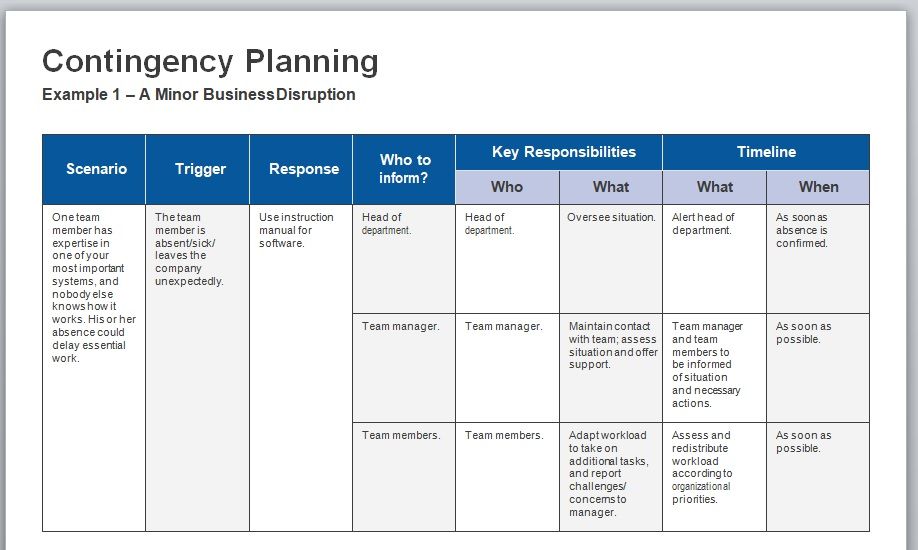
The download button for this Continuity Plan Template is here.

The download button for this Continuity Plan Template is here.

The download button for this Continuity Plan Template is here.

The download button for this Continuity Plan Template is here.
Business Continuity Plan vs. Disaster Recovery Plan
These two documents are often confused. A disaster recovery (DR) plan covers restoring IT systems and data specifically — servers, applications, backups, and the technical steps to bring them back. A business continuity plan covers keeping the entire business running: people, facilities, suppliers, communications, and customer commitments — with IT recovery as one component inside it. A company can restore every server and still fail its customers if nobody arranged an alternate warehouse; the BCP is the document that thinks about both. In practice, larger organizations maintain a DR plan as a technical annex to the BCP, while small businesses usually fold a short IT-recovery section into a single continuity plan.
Business Continuity Planning for Small Businesses
A small business doesn’t need a fifty-page plan — it needs a short one that exists. A realistic BCP for a team of five to twenty people is three to five pages: the critical-functions table, one paragraph of recovery strategy per critical function, a one-page contact roster (printed and kept off-site or in each key person’s phone), and a note of where backups live and who has verified them recently. Assign the plan one owner, walk through a scenario over a lunch hour once a year (“the office floods tonight — what happens tomorrow morning?”), and update the contact page whenever staff change. That modest routine puts a small company ahead of most of its competitors, and any of the templates above can be trimmed to this size by deleting sections.
Frequently Asked Questions
What is the difference between a business continuity plan and a disaster recovery plan?
A disaster recovery plan restores IT systems and data; a business continuity plan keeps the whole business operating — staff, premises, suppliers, and customers — with IT recovery as one part. See the comparison section above for how the two fit together.
What are RTO and RPO?
RTO (recovery time objective) is how quickly a function must be restored after disruption — its downtime deadline. RPO (recovery point objective) is how much data loss is acceptable, which determines backup frequency: an RPO of one hour requires hourly backups.
How often should a business continuity plan be tested and updated?
Test at least annually — even a tabletop walkthrough of one scenario counts — and update after every test, major staffing change, office move, or new critical system. The most common real-world failure is an accurate plan attached to an outdated contact list.
Does a small business need a business continuity plan?
Yes — arguably more than a large one, since small firms have less slack to absorb downtime and are less likely to survive extended interruptions. The difference is scale: a few pages with a current contact roster and verified backups covers most small-business scenarios.
What should a business continuity plan include?
Six components: a business impact analysis ranking functions by criticality, recovery time and recovery point objectives, recovery strategies per critical function, roles and emergency contacts, a communication plan, and a testing and review schedule. The structure section above explains each.

Pete Smith is a Business Management graduate and a passionate advocate for practical, accessible resources that empower professionals and entrepreneurs to succeed. With a strong foundation in organizational strategy and operational efficiency, Pete combines academic knowledge with real-world insights to simplify complex business processes. He is the creator behind a growing online platform dedicated to offering free, high-quality documents, templates, and actionable tips designed to save time and improve productivity.